
Appearance
Signing Into OneIDEX
Welcome back! Choose the sign-in method that matches how you originally created your OneIDEX account.
Sign-In Options
✉️ Sign In with Email & Password Use your OneIDEX email and password
- Includes email verification for security
- For accounts created with local credentials
🔗 Sign In with Microsoft Account Use your Microsoft account credentials
- Quick and secure single sign-on
- For accounts created with Microsoft integration
Can't Remember Which Method You Used?
Try this approach:
- Start by entering your email on the login page - if you get the error below, you likely setup OneIDEX with your Microsoft account.
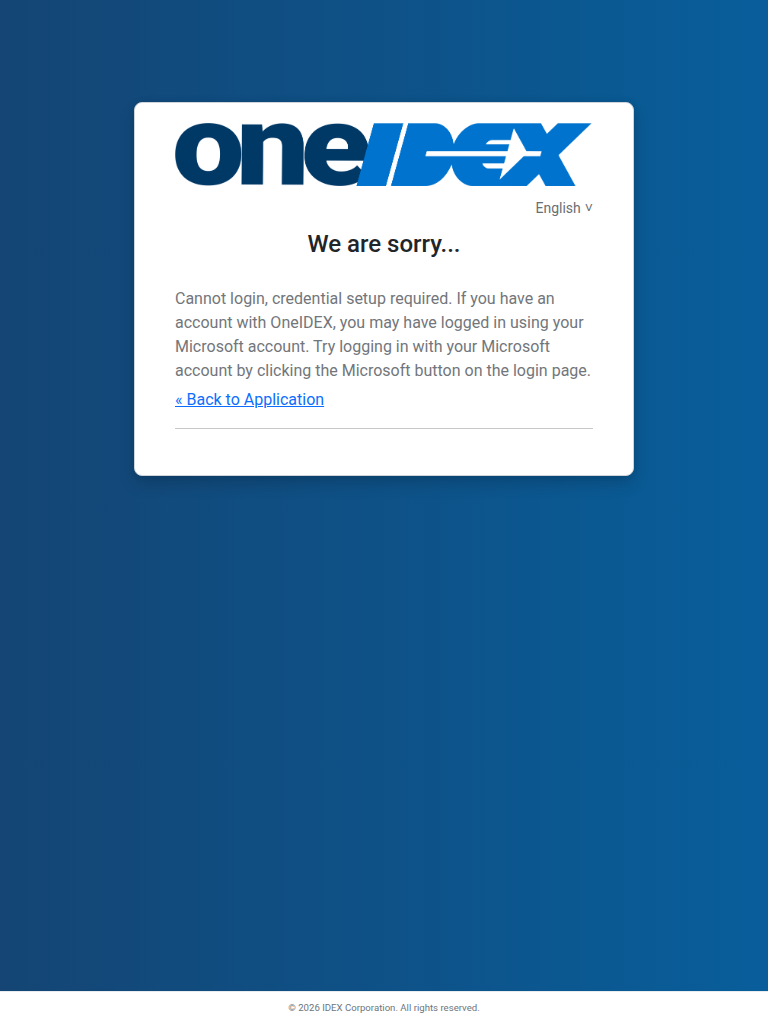
- Still having trouble? - Contact support with your email address
Common Sign-In Issues
"Invalid email or password"
- Double-check your email address for typos
- Verify you're using the correct password
- Try the "Forgot Password" option if needed
"Account not found" with Microsoft
- Make sure you're using the same Microsoft account you registered with
- Try using email/password login instead
- Contact support if the issue persists
Not receiving verification emails?
- Check your spam/junk folder
- Verify the email address is correct
- Wait a few minutes and try again
Security Features
Email & Password Accounts
- Email verification - We send a code to your email for additional security
- Password requirements - Strong passwords help protect your account
- Remember me option - Stay signed in on trusted devices
Microsoft Accounts
- Single sign-on - Use Microsoft's secure authentication
- Managed by your organization - Your organization controls the security policies around your account. If you forget your password or have an issue, you can follow your organization's normal procedures for getting access.
Ready to sign in? Choose your sign-in method above and follow the step-by-step instructions!